- Browse Source Code: https://github.com/JocysCom/JsClasses
- Download (3.2 MB): https://github.com/JocysCom/JsClasses/archive/master.zip
- Article on Code Project: Object-Oriented-JavaScript-Class-Library-in-C-NET
Introduction
Welcome to Object Oriented JavaScript class library in C#/.NET style. This JavaScript library contains hashing (MD5, HMACMD5, SHA1, HMACSHA256, SHA256), encryption (AES, RSA) and some other JavaScript classes compatible with Microsoft .NET Framework. Examples for server are (Federal Information Processing Standard) FIPS-compliant. You can use these classes for end-to-end encryption between web clients.
It allows you to write some JavaScript code 100% identical to C#. For example, this is JavaScript code which converts unicode text to bytes and then creates Base64 string from it:
var text = "おはようございます – Good morning!";
var bytes = System.Text.Encoding.UTF8.GetBytes(text);
var base64 = System.Convert.ToBase64String(bytes);
// base64: 44GK44Gv44KI44GG44GU44GW44GE44G+44GZIOKAkyBHb29kIG1vcm5pbmch
Background
I like coding with JavaScript in object oriented style. But one day, I decided to bring my code into another level and make my JavaScript code to look like C# as much as possible. So I did the following:
- Started to use .NET coding standards on my JavaScripts. You can find them on MSDN - .NET Framework General Reference: Naming Guidelines.
- Ported some useful classes and methods from .NET to JavaScript with the same class and property names. Some code parts were written from scratch, some parts were borrowed from the Internet and some parts were ported from C# directly.
- Started to use XML Comments inside JavaScript. They are not supported very well by Visual Studio 2008 but I hope support will be better in the future.
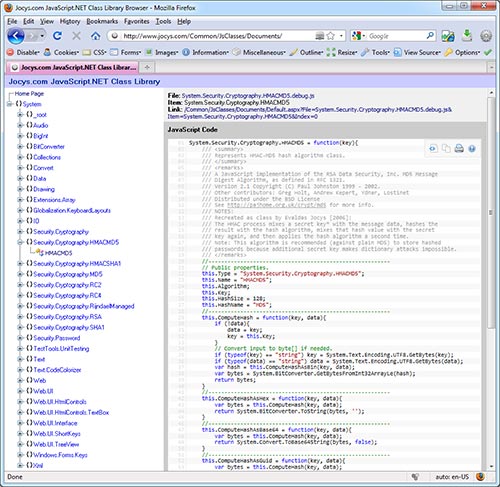
Example: Hash Algorithm - HMAC-MD5 Checksum
C# (3.0) code to create HMAC-MD5 checksum:
// Create HMAC-MD5 Algorithm.
var hmac = new System.Security.Cryptography.HMACMD5();
// Convert string to array of bytes.
var key = System.Text.Encoding.UTF8.GetBytes("test key");
var data = System.Text.Encoding.UTF8.GetBytes("test data");
// Compute hash.
var hashBytes = hmac.ComputeHash(key, data);
// Convert to HEX string.
var hex = System.BitConverter.ToString(hashBytes);
// Convert to GUID so you can store it inside database.
var guid = new System.Guid(hashBytes);
HMAC-MD5 checksum code written with this JavaScript library:
Include JavaScripts:
- System.js
- System.BitConverter.js
- System.Text.js
- System.Security.Cryptography.MD5.js
- System.Security.Cryptography.HMACMD5.js
// Create HMAC-MD5 Algorithm.
var hmac = new System.Security.Cryptography.HMACMD5();
// Convert string to array of bytes.
var key = System.Text.Encoding.UTF8.GetBytes("test key");
var data = System.Text.Encoding.UTF8.GetBytes("test data");
// Compute hash.
var hashBytes = hmac.ComputeHash(key, data);
// Convert to HEX string.
var hex = System.BitConverter.ToString(hashBytes);
// Convert to GUID so you can store it inside database.
var guid = new System.Guid(hashBytes);
As you can see, the code is 100% identical. SHA-1 hash algorithm class is also available.
Example: Symmetric algorithm - AES-256 encryption
Online Examples:
JavaScript code for AES-256 encryption is identical to C# code except only one minor
difference. In JavaScript, I need to use "new System.Byte(length)"
(line 20) instead of simple "new byte[length]". Of course, I can create
a class alias by doing "byte = System.Byte" inside JavaScript and make
that difference smaller:
Include JavaScripts:
- System.js
- System.IO.js
- System.Text.js
- System.Convert.js
- System.BitConverter.js
- System.Security.Cryptography.js
- System.Security.Cryptography.SHA1.js
- System.Security.Cryptography.HMACSHA1.js
- System.Security.Cryptography.AES.js
// Turn input string into a byte array.
var input = System.Text.Encoding.Unicode.GetBytes("Plain Text");
// Create an instance of the Rijndael class.
var cipher = new System.Security.Cryptography.AesCryptoServiceProvider();
// Calculate salt to make it harder to guess key by using a dictionary attack.
var password = System.Text.Encoding.UTF8.GetBytes("password");
var hmac = new System.Security.Cryptography.HMACSHA1(password);
var salt = hmac.ComputeHash(passwordBytes);
// Generate Secret Key from the password and salt.
// Note: Set number of iterations to 10 in order for JavaScript example to work faster.
var secretKey = new System.Security.Cryptography.Rfc2898DeriveBytes(password, salt, 10);
// Create a encryptor from the existing SecretKey bytes by using
// 32 bytes (256 bits) for the secret key and
// 16 bytes (128 bits) for the initialization vector (IV).
var key = secretKey.GetBytes(32);
var iv = secretKey.GetBytes(16);
// Get cryptor as System.Security.Cryptography.ICryptoTransform class.
var cryptor = cipher.CreateEncryptor(key, iv);
// Create new Input.
var inputBuffer = new System.Byte(input.length);
// Copy data bytes to input buffer.
System.Buffer.BlockCopy(input, 0, inputBuffer, 0, inputBuffer.length);
// Create a MemoryStream to hold the output bytes.
var stream = new System.IO.MemoryStream();
// Create a CryptoStream through which we are going to be processing our data.
var mode = System.Security.Cryptography.CryptoStreamMode.Write;
var cryptoStream = new System.Security.Cryptography.CryptoStream(stream, cryptor, mode);
// Start the crypting process.
cryptoStream.Write(inputBuffer, 0, inputBuffer.length);
// Finish crypting.
cryptoStream.FlushFinalBlock();
// Convert data from a memoryStream into a byte array.
var outputBuffer = stream.ToArray();
// Close both streams.
stream.Close();
cryptoStream.Close();
// Convert encrypted data into a base64-encoded string.
var base64String = System.Convert.ToBase64String(outputBuffer);
// base64String = laFf3eKu9tzB2XksJjd8EVM3PA9O30wz0Y+X3nyelW4=
Example: Asymmetric algorithm - RSA encryption
RSA JavaScript classes are compatible with Microsoft .NET Framework. It means that
you can encrypt/decrypt data with JavaScript and encrypt/decrypt it with "System.Security.Cryptography.RSACryptoServiceProvider"
Microsoft .NET Framework class. You can export, import, generate RSA Keys and use
"Direct Encryption (PKCS#1 v1.5)" and "OAEP padding (PKCS#1 v2)" padding.
RSA allows you to encrypt and submit data securely without Secure Sockets Layer (SSL). You can check System.Security.Cryptography.RSA.aspx example. This is done in 3 simple steps:
- Step 1: Server generates RSA key and shows only public key to the user on the web
page.
Note: Private RSA key is stored on server side and only server can decrypt submitted data. - Step 2: User enters password or other sensitive data into textbox.
- Step 3: User hits [Submit] button. JavaScript will encrypt password with RSA public
key, replace plain text with encrypted Base64 code and submit web form to the server.
Note: You can use strong password and AES symmetric encryption to submit extra data.
Online Examples:
Include JavaScripts:
- System.js
- System.IO.js
- System.Text.js
- System.Convert.js
- System.BitConverter.js
- System.Security.Cryptography.js
- System.Security.Cryptography.SHA1.js
- System.Security.Cryptography.HMACSHA1.js
- System.Security.Cryptography.RSA.js
C# and JavaScript code for RSA encryption/decryption is 100% identical:
// Text to encrypt and decrypt.
var text = "plain text";
// Use OAEP padding (PKCS#1 v2).
var doOaepPadding = true;
// RSA 512-bit key: Public (Modulus), Private (D) and CRT (P, Q, DP, DQ, InverseQ).
var xmlParams =
	"<RSAKeyValue>" +
		"<Modulus>pxtmFnrGI6Sb8ziyY+NRUDuQ4b/ETw5WabQ4daFQqzsCEr/6J/LLBU/2D5mO5/Wu5U/Rya1E55aYFZeaZMNqAw==</Modulus>" +
		"<Exponent>AQAB</Exponent>" +
		"<P>2TsVXWPEvDIJv/gd2rX9k0UOyXuaYgoAchIH6vUicis=</P>" +
		"<Q>xO4+OYREQfqYRQK7y73+RaUG0IxobT0OQ0c+Ok2hc4k=</Q>" +
		"<DP>K7/xgpiIU9rECeyfnp/OjS14V+3T3vDivBaTj6eFI3c=</DP>" +
		"<DQ>K4N9ClZ4gp+tn6oP9t//XEIvtEsiE+kmyqTmUhmvMAk=</DQ>" +
		"<InverseQ>p7o4BOlKZQZ693R1ViZ66y5gTjUkNNTd2za7/1YGBCs=</InverseQ>" +
		"<D>XZqFVrYy4qhECruJgVZFp/GVuD5Y0gev88nVjl5r911QT+I8vgJSklTso7jTlpMtf2oe7UZ0WRWEtgPS3tZn4Q==</D>" +
	"</RSAKeyValue>";
// ------------------------------------------------
// RSA Keys
// ------------------------------------------------
var rsa = new System.Security.Cryptography.RSACryptoServiceProvider();
// Import parameters from XML string.
rsa.FromXmlString(xmlParams);
// Export RSA key to RSAParameters and include:
//    false - Only public key required for encryption.
//    true  - Private key required for decryption.
// Export parameters and include only Public Key (Modulus + Exponent) required for encryption.
var rsaParamsPublic = rsa.ExportParameters(false);
// Export Public Key (Modulus + Exponent) and include Private Key (D) required for decryption.
var rsaParamsPrivate = rsa.ExportParameters(true);
// ------------------------------------------------
// Encrypt
// ------------------------------------------------
var decryptedBytes = System.Text.Encoding.UTF8.GetBytes(text);
// Create a new instance of RSACryptoServiceProvider.
rsa = new System.Security.Cryptography.RSACryptoServiceProvider();
// Import the RSA Key information.
rsa.ImportParameters(rsaParamsPublic);
// Encrypt byte array.
var encryptedBytes = rsa.Encrypt(decryptedBytes, doOaepPadding);
// Convert bytes to base64 string.
var encryptedString = System.Convert.ToBase64String(encryptedBytes);
// ------------------------------------------------
// Decrypt
// ------------------------------------------------
// Convert base64 string back to bytes.
encryptedBytes = System.Convert.FromBase64String(encryptedString);
// Create a new instance of RSACryptoServiceProvider.
rsa = new System.Security.Cryptography.RSACryptoServiceProvider();
// Import the RSA Key information.
rsa.ImportParameters(rsaParamsPrivate);
// Decrypt byte array.
decryptedBytes = rsa.Decrypt(encryptedBytes, doOaepPadding);
// Get decrypted data.
text = System.Text.Encoding.UTF8.GetString(decryptedBytes);
// ------------------------------------------------
// Generate new RSA Key pair
// ------------------------------------------------
// Specify RSA key size.
var keySize = 512;
// Create a new instance of RSACryptoServiceProvider.
rsa = new System.Security.Cryptography.RSACryptoServiceProvider(keySize);
// Export the RSA Key information as XML string.
//    false - Only public key required for encryption.
//    true  - Private key required for decryption.
xmlParams = rsa.ToXmlString(true);
Example: User Interface
Library contains some user interface classes.
function firstButton_Click(){
    Trace.Write("First Button Click");
}

function secondButton_Click(){
    Trace.Write("Second Button Click");
}

function Window_Load(){
    Trace.IsEnabled = true;
    Trace.Write("Start Demo");
    // Create toolbar.
    var toolBar = new System.Web.UI.Interface.ToolBar("MyToolBar");
    // Add toolbar to document.
    document.body.appendChild(toolBar.Node);
    // Create Bar.
    var bar = new System.Web.UI.Interface.Bar("MainBar", document, "Bar Title");
    toolBar.Add(bar);
    // Create first button.
    var firstButton = new System.Web.UI.Interface.Button("FirstButton", document);
    firstButton.SetText("First");
    firstButton.SetImage("Images/Icons/Options-16x16.png");
    firstButton.SetTitle("First Button");
    firstButton.customAction = firstButton_Click;
    bar.Add(firstButton);
    // Create second button.
    var secondButton = new System.Web.UI.Interface.Button("SecondButton", document);
    secondButton.SetText("Second");
    secondButton.SetImage("Images/Icons/Trace.16x16.png");
    secondButton.SetTitle("Second Button");
    secondButton.customAction = secondButton_Click;
    bar.Add(secondButton);
}

window.onload = Window_Load;
Will produce this interface on the web page:

Benefits
Coding with JavaScript in C# .NET style provides these benefits:
- Any C# developer instantly understands the purpose of JavaScript code.
- You don't need to write help for your new JavaScript classes because Microsoft did it already.
- When porting a new class from C# to JavaScript, you don't need to think about how to name it or where to put it. All you need is to look for the same class in C# and use the same naming.
- More JavaScript classes you have, the easier it will be to port new ones.
- By using C# classes as primary reference, it will be much easier for different developers to write and integrate JavaScript classes into one big file library. It is because by looking at some C# class, the developer knows what type of input and output function must support/produce and he doesn't need to coordinate this with other developers.
- And many more...
Requirements
JavaScript has a very limited number of types:
| JavaScript Object | typeof(Object) |
Object
|
'object'
|
Array
|
'object'
|
Function
|
'function'
|
String
|
'string'
|
Number
|
'number'
|
Boolean
|
'boolean'
|
null
|
'object'
|
undefined
|
'undefined'
|
But by combining the existing types, we can create JavaScript objects similar to C#. For example:
| C# Type | JavaScript Type |
public
|
property declared with "this." prefix: this.Name = "";
|
private
|
property declared with "var" prefix: var name = "";
|
class
|
this.[ClassName] = function(){... without "return value;" at the end
|
void
|
function which has no "return value;" at the end |
short/Int16
|
whole Number from [-2^15, 2^15-1] range |
int/Int32
|
whole Number from [-2^31, 2^31-1] range |
long/Int64
|
whole Number from [-2^63, 2^63-1] range (Requires BigInteger class)
|
byte
|
whole Number from [0, 255] range: var b = 14;
|
sbyte
|
whole Number from [-128, 127] range: var sb = -14;
|
bytes[]
|
Array() filled with integers from [0-255] range.
|
bit
|
Number: 0 or 1 |
bit[]
|
Array() filled with integers from [0-1] range.
|
char
|
String which contains a single character. Declared with single quotes:
var c = 's'
|
char[]
|
Array() filled single characters:
var chars = new Array(1); chars[0] = 's';
|
object
|
parameter which was declared with "{ }": var o = {};
|
enum
|
Object with "Enum" sufix and comma separated values: this.TriStateEnum
= { Unknown: -2, False: 0, True: 1 }
|
EventHandler
|
function with parameters "sender" and "e": function(sender,
e) or this.Click(sender, e)
|
NUMBERS: All numbers in JavaScript are 64-bit (8 bytes) floating point numbers (double:
1-bit sign, 11-bits exponent, 52-bits mantissa). There is no Double,
Single/Float, Boolean, Int16,
UInt16, Int32 or UInt32. But you can use
public static methods of System.BitConverter JavaScript
class in order to treat the same JavaScript number as a different type:
// Convert number to [0x00, 0x00, 0xCC, 0xCC] array.
var bytes = System.BitConverter.GetBytes(-859045888, System.TypeCode.Int32);
// Convert bytes back to -859045888.
var n = System.BitConverter.ToInt32(bytes, 0);
System.BitConverter JavaScript class supports little-endian (default),
big-endian byte orders and numeric arrays. System.BitConverter class
is very useful in encoding/decoding/encryption/decryption classes. Please note that
you need to specify number type when using GetBytes(value, typeCode)
method by using System.TypeCode enumeration values (this enumeration
is located inside System.js file).
I've added System.BigInt class (same as .NET internal System.Security.Cryptography.BigInt
class). It represents an arbitrarily large signed integer whose value in
theory has no upper or lower bounds. It means you can add, subtract, multiply, divide
numbers of Godzilla proportions in JavaScript which can be useful with client side
encryption:
// Increase global System.BigInt size to 512 bytes.
// BigInt will act like System.Int4096 (default is System.Int1024).
System.BigInt.MaxBytes = 512;
// Create big integer from hexadecimal number.
var n1 = new System.BigInt("0x010203040506");
// Create big integer from decimal number.
var n2 = new System.BigInt("-280422911905295");
// Multiply them.
var n3 = System.BigInt.Multiply(n2, n1);
// Store result in various forms.
var h = n3.ToHex()     // -0x01010C234779B3FAEED09F5A
var d = n3.ToDecimal() // -310751254825142252681076570
var bytes = n3.Elements // A6602F11054C86B8DCF3FEFEFFFFFF...
NOTE: You can use <param type="byte[]" name="data">...</param>
inside JavaScript XML Comments in order to specify type of input data and <returns
type="double">...</returns> - for output.
JavaScript IntelliSense
Visual Studio 2010 has built-in support for JavaScript IntelliSense. This means
that if you open file, place cursor at the end of file and type "System."
then straight after the dot, Visual Studio will bring up a menu containing all available
methods and properties of System class:

System.Type.Inherits method allows to use IntelliSense from inside of inherited
class:
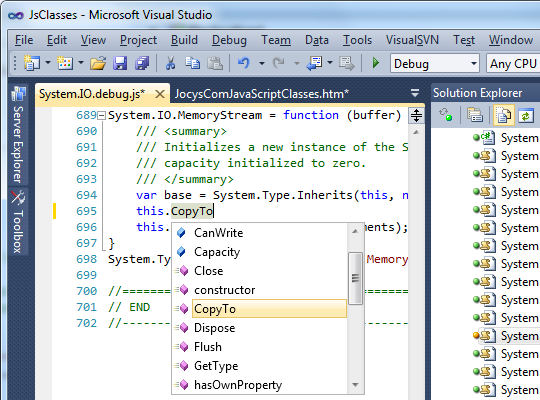
The good news here is that Microsoft is moving in the right direction. The bad news is that JavaScript IntelliSense works only with specific JavaScript coding style and sometimes needs workarounds. In other words, it works in mysterious ways or doesn't work at all :). Some upgrades are needed on my code too.
Installation
Extract source archive into webroot (/) folder of your website.
Example: System.Security.Password
Inside the source code, you can find examples (Examples/) including password generator example. You can run it:
- inside your web browser with: Examples/System.Security.Password.htm
- as Windows HTML application: Examples/System.Security.Password.hta
- or on-line: https://www.jocys.com/Common/JsClasses/Examples/System.Security.Password.htm
